
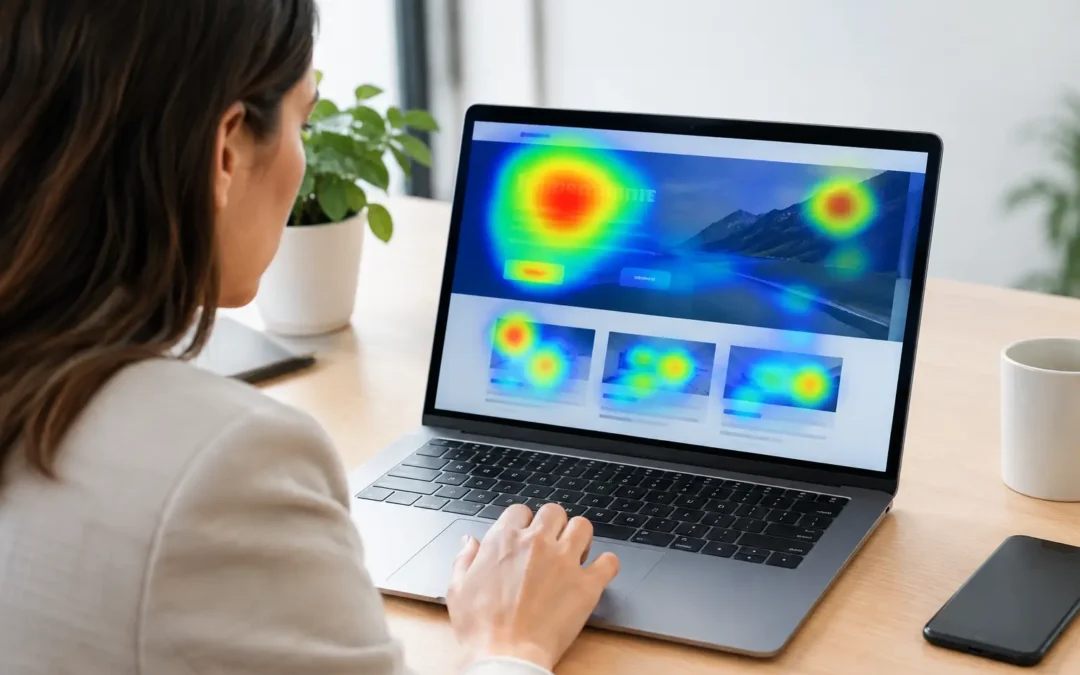
A homepage can look polished, rank well, and still leave revenue on the table. Website heatmap tools show what standard analytics cannot: where real visitors click, hesitate, ignore key content, and abandon the path to becoming a lead. For businesses competing for every call, form submission, and booked consultation, that behavior is not trivia. It is direction.
Website Heatmap Tools Show What Reports Miss
Traffic reports tell you how many people reached a page. Conversion reports tell you whether they completed a goal. Both matter, but neither explains the gap between a visit and a conversion.
A heatmap adds the missing layer. It visualizes visitor behavior through colors and recordings, showing high-engagement areas in warm tones and overlooked areas in cooler ones. Instead of debating whether a call-to-action is visible enough, your team can see whether visitors are actually engaging with it.
That makes heatmaps especially valuable for service businesses with longer consideration cycles. A prospective client may review services, compare credentials, read reviews, look for service areas, and visit a contact page before taking action. If they stop halfway through the journey, a heatmap can help expose the friction.
The goal is not to watch visitors for the sake of curiosity. The goal is to identify the page-level obstacles holding back leads: a weak offer, a buried phone number, a confusing navigation menu, a slow mobile experience, or a form that asks for too much too soon.
The Behavior Views That Matter Most
Click maps show where users tap or click. They can reveal whether people interact with navigation items, buttons, images, accordions, and links. They also identify rage clicks, where a visitor repeatedly clicks an element that appears interactive but does nothing. That is a clear signal of frustration.
Scroll maps show how far visitors move down a page. This matters when your strongest proof points, pricing guidance, reviews, or contact prompts sit below the point where most people leave. A long page is not automatically a problem, but its structure has to earn continued attention.
Move maps track cursor movement on desktop, which can suggest where visitors focus. Session recordings go further by replaying an anonymized visit. Used carefully, recordings help explain confusing paths that a heatmap alone may not capture, such as repeated form errors or visitors bouncing between two service pages.
What to Look for in Website Heatmap Tools
The best platform is not necessarily the one with the largest feature checklist. It is the one that gives your team clear evidence to make smarter marketing and website decisions. For most small to mid-sized businesses, the practical requirements are straightforward.
First, choose a tool that separates desktop and mobile behavior. Mobile visitors often interact with a website very differently than desktop users. A button that performs well on a large screen may be hidden, crowded, or difficult to tap on a phone. If mobile drives a meaningful share of your traffic, combined reports can conceal a costly problem.
Second, make sure you can filter data by page, traffic source, device type, and date range. A landing page visitor from a paid search campaign has a different intent level than someone arriving from an informational blog post. Looking at them together can produce the wrong conclusion.
Third, prioritize privacy controls. Heatmap software should support consent settings and mask sensitive form fields, payment details, and personally identifiable information. Your website needs to improve performance without creating an unnecessary privacy risk. This is especially relevant for healthcare providers, legal firms, financial services, and any business collecting detailed inquiry information.
Finally, assess how the platform fits with your existing measurement setup. Heatmap data is most useful when it is viewed alongside Google Analytics, call tracking, paid campaign results, and CRM outcomes. A page with fewer form submissions may still be producing high-value phone calls. Context prevents your team from optimizing for a shallow metric.
How to Use Website Heatmap Tools to Increase Leads
Heatmaps produce the strongest results when they support a deliberate conversion optimization process. Do not install one, scan a few colorful reports, and redesign a page based on instinct. Start with pages that affect revenue and work from evidence.
Start With High-Intent Pages
Focus on pages where visitors should take a meaningful next step: service pages, location pages, paid advertising landing pages, contact pages, and high-traffic blog posts with clear commercial relevance. A heatmap on a low-traffic page may be interesting, but it is unlikely to move the needle.
Review pages with strong traffic but weak conversions first. If a service page ranks well but generates few calls or form completions, examine where visitors stop scrolling and which elements attract clicks. They may be looking for information the page does not answer, such as service pricing, availability, process details, or proof that you serve their location.
Compare User Intent With Page Design
A visitor arriving from a search for an emergency service is not looking for a brand story. They need immediate confidence, quick answers, and a clear way to contact you. If the heatmap shows they are clicking the logo, opening the navigation, or scrolling past the main call-to-action, the page may not be matching the urgency of the search.
The same principle applies to professional services. People comparing accountants, lawyers, consultants, or clinics want signs of expertise and trust. If recordings show visitors moving directly to testimonials, credentials, case results, or team biographies, those elements may deserve stronger placement near the top of the page.
This is where heatmap data becomes a competitive advantage. Your competitors may be guessing at what their visitors want. You can build pages around observed behavior.
Fix One Friction Point at a Time
Avoid changing everything at once. If you rewrite the headline, replace the imagery, shorten the form, alter navigation, and move the call-to-action in a single update, you will not know what improved results.
Create a focused hypothesis instead. For example: visitors are not reaching the form because the page places it after several long content sections. Move a concise contact prompt or click-to-call button higher on the page, then measure the impact on leads over an appropriate period.
Other common improvements include making a phone number persistent on mobile, clarifying what happens after a form is submitted, reducing unnecessary form fields, adding trust signals beside conversion points, and turning non-clickable visual elements into clear interactive components. The right fix depends on the evidence, not on a generic conversion checklist.
Measure Lead Quality, Not Just Activity
More clicks do not always mean better performance. A flashy design change can increase interaction while distracting users from the action that matters. The real question is whether your website generates more qualified calls, inquiries, appointments, and sales opportunities.
Track the outcome through your analytics and CRM. If a revised page improves form completions but produces lower-quality leads, revisit the page messaging and qualification process. If fewer visitors submit a form but more become customers, that may be a meaningful win.
Common Heatmap Mistakes That Waste Time
The biggest mistake is treating heatmaps as proof rather than a clue. A click pattern can show that visitors are interested in something, but it cannot always explain why. Pair behavior data with search terms, campaign messaging, page speed data, and customer feedback before making a major decision.
Another mistake is acting on too little data. A handful of recordings can be useful for spotting obvious bugs, but they are not enough to support a broad redesign. Wait until you have a meaningful sample for the traffic level and decision at hand. For a low-volume B2B page, that may take longer than it does for a high-traffic e-commerce page.
It is also easy to ignore technical issues. If recordings show visitors abandoning a page before engaging, check loading speed, mobile layout, broken elements, and browser compatibility. No amount of persuasive copy can overcome a page that fails to load cleanly.
Turn Visitor Behavior Into a Stronger Growth Engine
Your website should do more than present your business. It should direct high-intent visitors toward a call, quote request, consultation, or purchase with as little resistance as possible. Heatmaps give marketing teams a practical way to see where that path breaks down.
At WYK Web Solutions, we use behavioral insight as part of a bigger performance strategy that connects web design, SEO, paid traffic, and conversion tracking. The strongest improvements happen when the page, the traffic source, and the offer all work toward the same commercial outcome.
Start with one revenue-critical page. Find the point where visitors lose momentum, make a measured improvement, and watch what changes. Small fixes in the right place can create a sharper website experience and a much stronger pipeline.